Sale prijs € 2,36.
Originele prijs € 3,14 per kaart
Je bespaart 25%
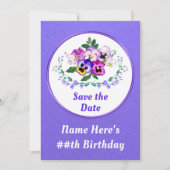
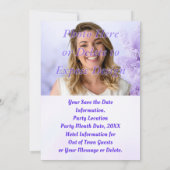
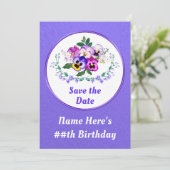
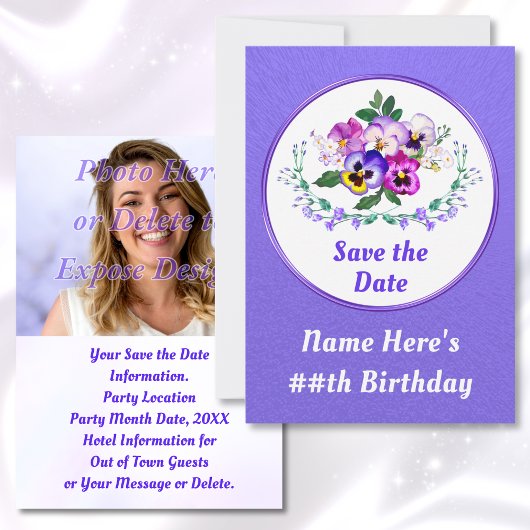
Verjaardagskaarten, "Save the Date"-kaarten met FO Kaart
Bekijk productdetailsOver Uitnodigingen
Aangeboden door
Over dit ontwerp
Verjaardagskaarten, "Save the Date"-kaarten met FO Kaart
Birthday Save the Date Template or we can Print them for You! Delete the PHOTO TEMPLATE to EXPOSE Pansy Flowers. Change to Floral Birthday Invitations. Birthday Save the Date Template is fully Customizable. You, or CALL Designer Linda: 239-949-9090 ET, can DELETE Any Text, the Picture Template or Design Layers by using the "Edit using Design Tool." You can also, TRANSFER this Design to over 1000 other, Flower Birthday Party Supplies, other, Flower Birthday Invitations, styles, paper type, decorations, gifts and more. See BELOW for brief INSTRUCTIONS on How to TRANSFER Design and make Design CHANGES or Call Linda for HELP or to make the CHANGES for you.
Only Designer Linda can CHANGE the Light Purple Save the Dates, Colors, Floral Design, White Center Background, etc. I can design your matching and coordinating, pink and purple save the date invitations, save the date cards birthday or Any Occasion, floral party supplies, favors, decorations, gifts, etc.
* * * FULLY CUSTOMIZABLE. Make CHANGES BEFORE you ORDER.
WHAT you SEE is WHAT you will RECEIVE.
* Click "PERSONALIZE" Button *
Delete Temporary Text.
Type in YOUR TEXT or DELETE.
* * * CLICK "EDIT USING DESIGN TOOL" to make MORE CHANGES:
Button located BELOW the Last TEXT BOX or IMAGE TEMPLATE.
* You can DELETE Design Layers, Text and Image Template. CHANGE COLORS of some Backgrounds and Font/Text (change Font Style), MOVE and RESIZE Designs, Text and Images.
* SELECT each Design Layer or Text, in the LEFT LAYERS COLUMN or Directly on the Design to Move, Resize, Change Background Color (background may be covered by a design that you can DELETE) and Text Colors.
* RESIZE Designs and Font/Text in RIGHT COLUMN.
RESIZE by entering a smaller or larger SIZE NUMBER or use the "- or +" Symbols. Change Font Style, Size, Colors, etc. MOVE Text and Designs.
* Change BACKGROUND COLOR: In LEFT LAYER COLOR. Click “BACKGROUND.” Choose one of the tiny Color Box, closest to your desired color. CLICK “+” Button and SLIDE the TWO COLOR SLIDERS for ANY COLOR Background.
* Change FONT COLOR: Select Text Layer. Click the Tiny Color Box in Right Column. Choose from a small selections of Color Boxes OR, better yet, Click “CUSTOM COLOR PICKER” tiny blue link. Slide the TWO Color Sliders to get ANY COLOR Text.
* * * TRANSFER DESIGNS:
Scroll Down. Below “TRANSFER a Design to a Product” either,
Scroll to the Right to See a Few Product Suggestions OR,
Click “VIEW ALL PRODUCTS” and Enter Desired Product Choice in the “Search for a Blank Product” Box. Select a Product. When available
Select from different Style, Size, Shapes, etc. Make your Changes because they are Fully CUSTOMIZABLE or CALL Designer Linda for HELP.
* * * FULLY CUSTOMIZABLE. Make CHANGES BEFORE you ORDER.
WHAT you SEE is WHAT you will RECEIVE.
* * * FULLY CUSTOMIZABLE. Make CHANGES BEFORE you ORDER.
WHAT you SEE is WHAT you will RECEIVE.
* Click "PERSONALIZE" Button *
Delete Temporary Text.
Type in YOUR TEXT or DELETE.
* * * CLICK "EDIT USING DESIGN TOOL" to make MORE CHANGES:
Button located BELOW the Last TEXT BOX or IMAGE TEMPLATE.
* You can DELETE Design Layers, Text and Image Template. CHANGE COLORS of some Backgrounds and Font/Text (change Font Style), MOVE and RESIZE Designs, Text and Images.
* SELECT each Design Layer or Text, in the LEFT LAYERS COLUMN or Directly on the Design to Move, Resize, Change Background Color (background may be covered by a design that you can DELETE) and Text Colors.
* RESIZE Designs and Font/Text in RIGHT COLUMN.
RESIZE by entering a smaller or larger SIZE NUMBER or use the "- or +" Symbols. Change Font Style, Size, Colors, etc. MOVE Text and Designs.
* Change BACKGROUND COLOR: In LEFT LAYER COLOR. Click “BACKGROUND.” Choose one of the tiny Color Box, closest to your desired color. CLICK “+” Button and SLIDE the TWO COLOR SLIDERS for ANY COLOR Background.
* Change FONT COLOR: Select Text Layer. Click the Tiny Color Box in Right Column. Choose from a small selections of Color Boxes OR, better yet, Click “CUSTOM COLOR PICKER” tiny blue link. Slide the TWO Color Sliders to get ANY COLOR Text.
We have HUNDREDS of different, birthday party theme ideas, birthday party supplies for her and him, decor and more. Many different COLORS and for Birthday Ideas for Her and Him and MORE HERE:
https://www.zazzle.com/store/littlelindapinda/products?cg=196065483903420255&rf=238147997806552929
See more, Pansy Birthday Invitations, Save the Date Cards, Lavender Save the Date Cards, Flower themed birthday ideas and MORE PANSY BIRTHDAY Ideas HERE:
https://www.zazzle.com/store/littlelindapinda/products?cg=196945878332959052
Ontwerp van international designer

Klant beoordelingen
4.6 van 5 sterren beoordeling11 aantal beoordelingen
11 Reviews
Beoordelingen voor identieke producten
5 van 5 sterren beoordeling
Door H b.11 september 2017 • Geverifieerde aankoop
Enkele uitnodiging, Maat: 12,7 x 17,8 cm, Papier: Signature Mat, Enveloppen: Wit
Zazzler recensent programma
mooie uitnodiging volledig wat we ervan verwacht hadden, goede kwaliteit. volledig wat ik ervan verwacht had
5 van 5 sterren beoordeling
Door Kimberly V.24 maart 2022 • Geverifieerde aankoop
Enkele uitnodiging, Maat: 12,7 x 17,8 cm, Papier: Signature Mat, Enveloppen: Wit
Zazzler recensent programma
Super mooi gedaan het is zelfs nog mooier dan we hadden verwacht. 😍😍. Super mooi, zelfs nog mooier dan we hadden verwacht
5 van 5 sterren beoordeling
Door N.5 april 2019 • Geverifieerde aankoop
Enkele uitnodiging, Maat: 12,7 x 17,8 cm, Papier: Signature Mat, Enveloppen: Wit
Zazzler recensent programma
prachtig afgewerkt, heeft wel lang geduurd om ze thuis te ontvangen. Kleuren zijn heel mooi, was zoals ik het wou. Heel tevreden van de invitatiekaart
Tags
Andere Info
Product ID: 256447481119937666
Ontworpen op: 11-1-2025 18:55
Rating: G
Recent bekeken items